11 Reverse -
Engineering
This week was a deep dive into the practical application of my research methodology of computational recreation combining computational experiements and case study. I reverse-engineered branded interactions from Duolingo, Apple, and Instagram in p5.js, treating the code environment as a controlled laboratory. This process moved the project from theory to rigorous making and revealed how precise parameter combinations systematically translate to specific brand feelings.
Week-eleven
20.Oct ~ 02.Nov, 2025Journal-by
Choi YerinKeywords
- Recreation
- Case-study
- Analytical-Lab
- Parameter-Control
- Easing-functions
Process Diragram
& P5.js Environment
Before documenting the iterative process of my recreations and outcomes I would like to note on several core techniques that I relied on in p5.js environment. These functions helped me isolate interaction parameters effectively, treating them as my instruments for computational control:
constrain() and map(): Essential for limiting numerical variables and translating a variable's range (like time) into an angle range or progress ratio.
Easings by Position: For animations in p5.js, applying easing functions to the positional valuestartX/Y to targetX/Yproved far more effective than trying to manage easing over absolute duration, especially for complex micro-interactions.
Motion Blur Technique: Using background transparency in the draw loop created a visible motion trail, which was invaluable for seeing the subtle effects of easing curves and oscillation patterns in real-time. This function was like an analytical aid, akin to onion skinning in After Effects, but more comprehensive.
Process Diagram
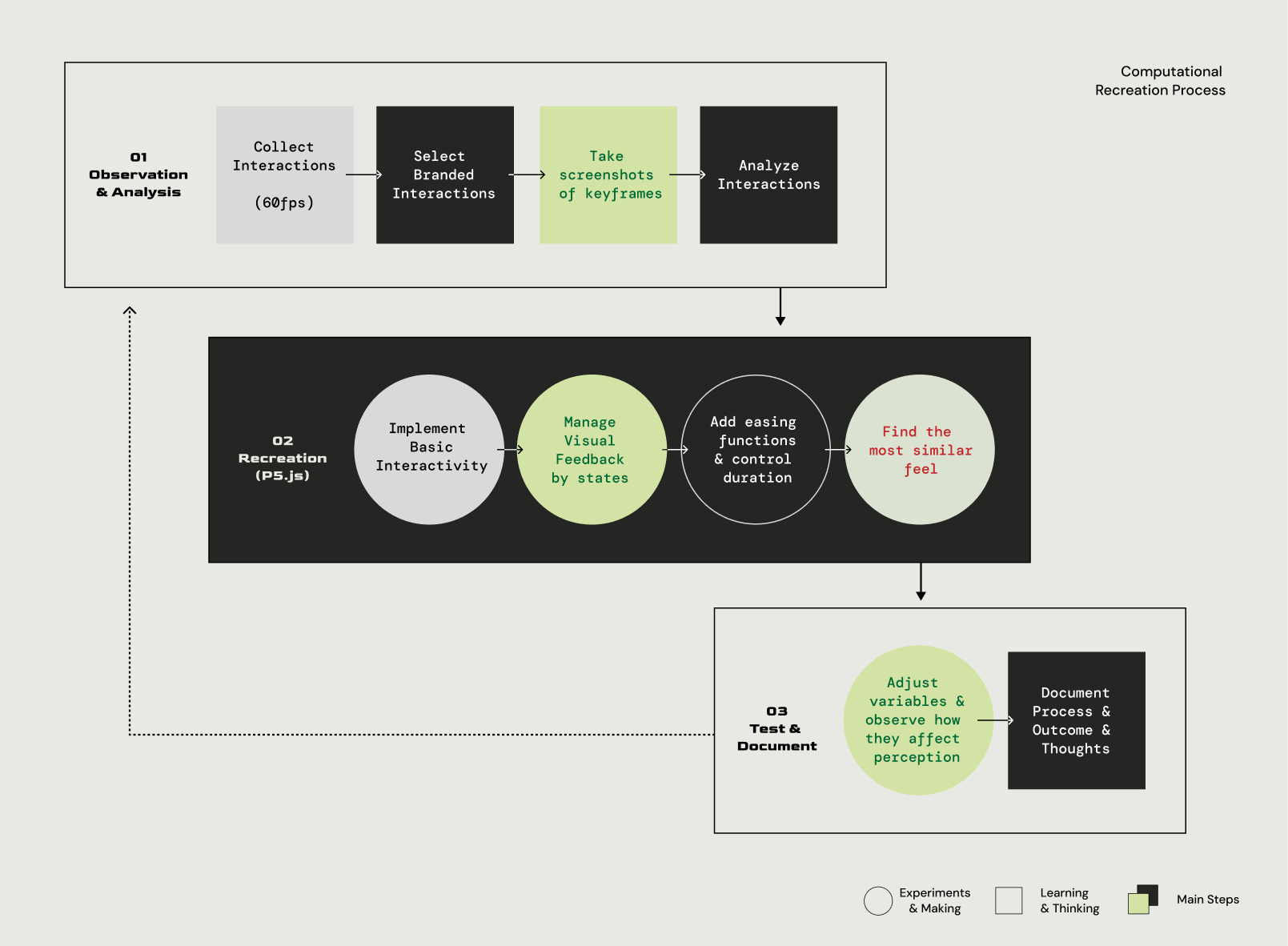
> Iterative Recreation Process Diagram
The core of my analysis for this week followed an established, iterative process. This loop, designed to systematically reverse-engineer complex interactions, ensured that subjective "feel" was quantified into measurable parameters.
The process began by selecting existing interactions from case studies and analyzing their patterns frame-by-frame.
I then implemented the basic interactivity using p5.js state management.
Next, visual feedbacks (like shadow or color shifts, but with a neutral palette) were added.
Crucially, I then added easing functions and controlled the duration of each animation to find the closest feeling to the original.
The most rigorous step involved adjusting one variable at a time to isolate and observe how different values affected perception.
The final step was detailed documentation of the process, results, and subjective thoughts.
Case Study Recreation
Recreating interactions exposed the precise design decisions
that I could not notice by simple visual obsservation.
01 Duolingo Button Interactions
> p5.js Recreation outcome
> Duolingo-Set-new-streakgoal-interaction
The Duolingo Streak button recreation revealed
a sophisticated tactile 3D-to-2D illusion.
Physical Simulation:
The pressed state removes the button's shadow while simultaneously shifting its Y position by 4 pixels. This mimics the physical feeling of a pop-up gaming console button being "pressed in," filling the gap left by the disappearing shadow.
> Step 01
> Step 02
> Step 03
Easing Choice:
I selected easeOutElastic over smoother alternatives like >easeOutExpo because the elastic quality imparted the necessary "snappy" and "playful" feel, reinforcing Duolingo’s encouraging personality.
> Step 04
> Step 05
Input-Output Harmony:
I observed a key compositional technique: the motion of the input (button press/release) uses an easeOut function, which is then immediately followed by the output (progress bar slide) using an easeIn function. This complementary sequencing creates a dynamic, connected transition that feels professional and intentional, similar to sequencing transition layers in After Effects.
> 6th Step of Duolingo Button Sketch
Click a button to interact
> 1th Step of Duolingo Button Sketch
Hover over a button to interact
02 Instagram Fast-action Button Interactions
> p5.js Recreation outcome
> Duolingo-Set-new-streakgoal-interaction
Recreating the Hold-to-Action pattern (for Reels/Stories)
highlighted the strategic use of input duration.
I found that ~15 frames created the quick, smooth ramp-up needed to match the original application's feel. This pattern is a clear example of Branding Input, creating a deliberate engagement pattern that aligns with Instagram's immersive brand values.
> Step 01
> Step 02
> Step 03
03 Apple's Wiggling icons
> Recreation Outcome of Apple's wiggling icons
Click the sketch and press + or - to increase/decrease the number of icons
Recreating the iconic iOS Wiggling Icons (in edit mode) forced a critical design decision about subtlety:
Parameter Restraint: I found that a small amplitude of 0.05 radians was necessary to match the iOS feel. Making it larger felt exaggerated and "panicked".
Brand Alignment: This extreme restraint communicates Apple’s brand values of confidence, adhering to their principle that motion should support, not overshadow.
Easing Applications:The easing function had to be applied to the amplitude envelope (the degree of wobble) rather than the oscillation speed to maintain a natural rhythm, preserving the sense that the icons are "alive" but "responsive".
Key Learnings:
Systematic Patterns
This intense week of reverse-engineering confirmed that what appears as subjective "feel" in branded interaction follows systematic and predictable patterns.
Compositional Easing: The observed easeOut/easeIn harmony is a compositional technique that ensures the flow from user action to system feedback is fluid and intentional.
Parameters as Brand Choices: Every variable (from the 4-pixel shadow shift in Duolingo to the 0.05 radian amplitude in Apple) is a deliberate design decision that impacts the brand's perceived personality.
Next Steps
The next logical step is to synthesize these technical findings with my theoretical mappings of brand identity (Kapferer's Prism). This will lead to the final phase of tool architecture development, ensuring the tool can generate these systematically verified parameters.